
Comprehensive DreamHost Shared & VPS Review (Updated June 2021)
Version 1.2
From Hosting Zoom (www.hostingzoom.com) to DreamHost (www.dreamhost.com) - A host which makes big promises, REALLY BIG promises. When I signed up on July 2007, it offered 500GB storage (that grows every week), 5TB (that's 5,000 GB) of bandwidth every month and five free yearly domain registrations thrown in! Plus PHP4 (currently discontinued, but possible to install as CGI), PHP5, Ruby On Rails, SSH, unlimited domain hosting and much more.
As of October 2012, DreamHost has stepped up its offering to unlimited space and bandwidth, a free domain registration, an additional 50GB space just for personal backups, free Google Adwords, live chat support and a 100% uptime guarantee!
But do they live up to their promise? The 100% uptime guarantees? Really unlimited bandwidth? Without further ado, here are the pros and cons of the service we've experienced so far as of October 2012. We continuously update this review with new changes, so keep checking back.
Quick to the Specifics of DreamHost Shared Hosting: The Good Things (Pros)
- BIG space and bandwidth and hosting of unlimited domains
- Direct DNS control of your domains! Setup subdomains to point to another server and all those technical DNS stuff all from your control panel yourself! There is no need to e-mail support for these kind of issues. With my previous cPanel setup, you always have to email Support to setup special DNS entries.
- SSH access. With SSH access, install whatever version of PHP you want or run a Python script. Note that PHP will be run as CGI, which will be explained in the Cons below.
- Big community of users in the web - if you have a problem setting up a script, chances are you will find someone else having the same problem too due to the large number of Dreamhost customers.
- Allows you to keep raw logs
for as long as you want!UPDATE: Now Dreamhost limits raw logs to 30 days! This is very disappointing!
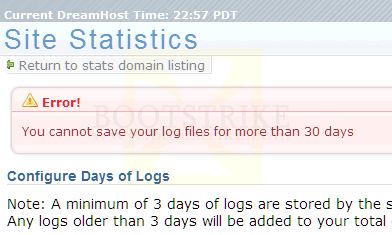
Max 30 days only for raw logs.
And they made this change quietly. I only came to know of it when I updated all domains to keep raw logs to 99999 days as I recently added two domains and was lazy to update them one by one. What happened was DreamHost reset all my domains to 30 days with the above error message! It caught me by surprise.
- INSTANT access to their backups. You can access a backup of your entire account for 1 hour ago, 1 day ago, 1 week ago and 2 weeks ago. For MySQL, you can access their backups for the past 5 days in 24hr intervals! This is a super cool feature that can save you from numerous disasters!
Note that you can access only those 4 save points at any one time. You cannot, for example, look for a backup that is 1.5 weeks old.
UPDATE: DreamHost is replacing this feature with a Domain Restore which requires you to perform 2 clicks before you can access the backup you want. It requires you to activate the restore option that you need and the control panel will place the restore files there. More steps than before, but can still be a godsend at times. - Direct access to the MySQL server from your home PC. No need for phpMyAdmin, although it is provided as well. Most web hosting companies do not allow you to access the MySQL server directly from your home for security reasons, but DreamHost does allow it.
- Supports Subversion - a Concurrent Versions System (CVS) for depositing source code. Great for team projects especially since Netbeans supports Subversion as well.
- Combining 7 and 8 above, you can use DreamHost as a central server for source files and database with your team members.
- 50GB of personal backup space is provided as well. Check under "Backups User" in control panel. Talk about a great free extra that you pay extra dollars at other sites. Not all hosts will be pleased if you use their unlimited space to store backups, but DreamHost explicitly allows it.
- Allows outgoing connections. Do all the domain whois checking, pings, trackbacks and search engine pinging you want!
- Extensive proprietary control panel. Allows configuring of many things down to the DNS level. You have to try the demo to believe it.
The Bad Things (Cons)
- Catch-all e-mail address can only be set to a
GMail addressUPDATE - catch-all e-mail addresses cannot be set to any external e-mail account, even GMail! You cannot forward Dreamhost catch-alls to even GMail accounts, only Dreamhost hosted e-mail accounts. A disappointing change. - Their proprietary control panel uses HTTPS for "security reasons". Yes, it is secure, but much slower as well. But it can prevent those wi-fi snoopers from capturing your session, just that it costs speed and bandwidth.
- Creating a subdomain takes a few hours to be activated. With cPanel, it is instant. Many other changes are also not instant, often taking up to 30 minutes. Some examples are registering a domain or creating a new e-mail forwarder. Such items are marked as "Change pending" till then.
- PHP 5 runs in FastCGI mode. Although the wiki entry says that there are only very few *minor* disadvantages, I found them very major. Here are the major issues I came across:
- It can be 400 to 700 percent slower depending on the server load. Quote from the wiki entry: It's just as fast as running PHP as an Apache module, Raaaight!
- CGI causes problems with some PHP scripts.
For newer domains, you are out of luck (or SOL) and are forced to use 500% slower PHP 5 CGI. There is a suggestion to run PHP 5 as a module since Nov 2005. To this day, it has not been implemented. Dreamhost Customers, please click here to vote for it. Alternatively, you can switch to DreamHost PS which allows you to run PHP 5 as an apache module. - It can be 400 to 700 percent slower depending on the server load. Quote from the wiki entry: It's just as fast as running PHP as an Apache module, Raaaight!
- No live chats or telephone support unless you opt for the higher plans. Live chat is actually allowed for free in the normal accounts when their load is lesser, so this is a minor con.
- No shared SSL unless you are willing to fork out for a static IP address and a SSL certificate.
- Raw logs can only be kept for a maximum of 30 days
- Monthly uptimes are not the best in the industry, neither are they the worst we've seen. But for the features and price, we find them a great value for money. They do offer a pro-rated refund for the downtime your sites incur. For this, you will have to manually email and request for a refund. We have not pursued this option as this would mean just a few cents of refund, not mentioning the constant monitoring of the site and email hassle just for a few cents.
DreamHost PS
Recently we moved to a DreamHost Virtual Private Server, as our domains were using too much resources at times. This was done on March 2010. Without further ado, here are the pros and cons so far.
Pros of DreamHost PS
- One week of play time to as much RAM as you want (max 4GB).
- Root access if you need
- RAM usage is charged based on the time you use, right down to the second*. So if you utilized 32MB of extra RAM (on top of the 300MB already given) for only 20 seconds, you are charged a cent (US$0.001) extra only!
- Live Text Chat, althought it can be unavailable at times
- Realtime CPU and Memory usage graphs that update every minute
- Deployment of PHP5 as a module, plus XCache to speed up even more
Cons of DreamHost PS
- Live Text Chat can be unavailable at times
- Certain issues can take a Technical Support lots of time to resolve (see July 2010 update below)
- RAM usage, although charged right down to the second, takes some time to make the change effective, up to as long as 15 minutes depending on how busy your server is.
- Restarts can take as fast as 1 minute to as long as 10 minutes. And when the restart is done, the DreamHost web panel does not allow you to restart the PS until a full 15 minutes later.
How is it compared to cPanel/WHM?
Recently we had to move some domains off Dreamhost to Go Daddy servers at www.godaddy.com which used cPanel/WHM due to the domains requiring a Asia server.
Since our last encounter with cPanel was at Hosting Zoom many years ago, many things have changed. Heck, we were not even familiar with WHM and there was just so many configuration options. The new cPanel/WHM is much better and allows configuration of DNS as well now!
Pros of DreamHost PS vs cPanel/WHM
- User Friendly
- All in one panel (billing, support, domain registration, etc)
Cons of DreamHost PS vs cPanel/WHM
- Not much configuration options
- Very limited customizability for sub-user privileges (e.g. a cPanel for each account, space limits, etc)
Problems with Hosting Zoom
You may be wondering why I left www.hostingzoom.com, known to be a reliable host from WebHostingTalk.com. I was under their 4.95 per month Zoom plan, when they had an 'all doubled' promotion going on. Since then, I have had these persistent problems which I grew tired of.
The words in italics are their support responses as best as I can recall. I believe Hosting Zoom outsources their support to India as I have been mostly seeing Indian names in live chats.
- FTP access breaks at times
Response: Your FTP works now. Let us know if we can help you with any other matters. - Support Ticket site does not maintain login information accurately hence I can never stay logged in for more than 2 pages.
Response: It looks like a problem on your side. Sorry we can't do anything here - Messing up the site's raw logs every once in a while resulting in a loss of some days of logs. This causes me to download the raw logs at least once every week due to a 'fear' that the raw logs may get corrupt.
Response: We'll ensure it never happen again - Raw logs are not included in their daily backups.
- Removing a custom DNS entry without any warning. This goes on until I realize it. Once or twice is fine. But it happens every once in a while.
None of the above issues exist with DreamHost so far. But I won't say that Hosting Zoom sucks - as the issues I had are not the major requirements of most hosting customers who are just looking for hosting.
Notable Experiences
June 2021: Goodbye Dreamhost
It's been such a long time since I updated this post.
The reason was that Dreamhost gave me little or no problems in the journey so far. Sometimes email was down, but it was usually fixed within 6 hours without me having to contact them.
Now, one month before renewal, they send me this email
RE: Upcoming Changes to your DreamHost Account
Pricing Update
Hi, Ganesh!
Thanks for choosing DreamHost. We're here to help your business find success, and we're excited to be your online partner. We're continually working to build services that meet the needs of your business.We're updating our pricing to help us continue to deliver the best hosting experience possible.
Your Shared Unlimited hosting plan's price will increase to $11.99 per month when it renews on XXXXXXX.
But...why?
The price of Shared hosting at DreamHost has remained the same for nearly a decade. Meanwhile, the growing needs of our many business customers have required that we invest in the hardware, software, and people that can help them reach their online goals.
In 2020 alone we:
- Completely redesigned your account control panel to be faster, more responsive, and more helpful
- Launched simple WordPress website imports and made DNS management easier than ever
- Significantly reduced the time it takes to receive a reply from our technical support team
- Become fully bilingual to better support our Spanish-speaking customers
- Upgraded and supported new versions of WordPress within days of their release
- Delivered the latest versions of web technologies like PHP to support the fastest web apps
- Launched a series of Professional Services to help your business find online successIn the last several years we:
- Brought encryption to all of our customers with free SSL certificates from the Let's Encrypt project
- Increased the memory limits on Shared hosting by 50% to support the latest web apps
- Launched support for HTTP/2 to ensure your sites are ready for the future of the web
- Completely improved our webmail service with an all-new app and beautiful user experiencePayment Options
If you'd like to continue your Shared Unlimited service, you need take no action. Your hosting will renew itself automatically at the updated rate on your next renewal date, XXXXXXX.Note:
- Don't forget, you can always view, modify, or cancel your Shared hosting plan before it renews at its new rate from within your DreamHost account control panel.Thanks for your business!
We've put a tremendous amount of focus on improving the DreamHost user experience in recent years and we've got even more in store for the future!If you have any questions or need help deciding how to move forward, please don't hesitate to reach out to our technical support team. They're standing by, ready to assist!
Thanks,
-The DreamHost Team
So it is goodbye to Dreamhost's panel as there are much cheaper alternatives around. I will be moving to Namecheap's Stellar Plus at $1.98/mo (59% off promo) CloudLinux shared hosting (after trialing Go Daddy's Deluxe hosting). CloudLinux shared hosting was a important factor as it means other users will be unable to use too much resources and slow down your site.
Go Daddy has CloudLinux shared hosting too, but their email was terribly slow for some reason. Sending a email through Go Daddy's system can be delayed from 2 minutes to 15 minutes or even more! And the server's load was well below 1.0. Even VPS has this problem when I last used it a few years ago.
"Hello, again!" cPanel and "Farewell" to Dreamhost's proprietory control panel. Look out for a review of it soon.
UPDATE: If you are planning to leave DreamHost, DO NOT use any of the free domain registrations in your plan even if you have paid upfront! Apparently they will be charged separately when you close your account.
If you are closing and have used a domain registration credit in the last year, the panel will ask you to pay for it before closing. This allows you to close the account while retaining control over your domain. However, if the domain is set to expire in the panel, and the registration is within 30 days of expiring, you will NOT be billed for it.
[...]
The domain registration is only free for the first year if you purchased a Shared (Shared Starter and Shared Unlimited) or DreamPress annual plan. If that annual plan is canceled in the first year, you must then pay for the domain registration which is yours to own.
October 2012: Different Datacenters
While we were updating this review, we noticed a new option called "Data Centers" in the navigation. Basically this page lays down where each server - database, mail, web servers and domains are physically located.
We discovered that the database was hosted in another datacenter. And then it occurred to us. That is why our database had been so slow! We were not able to diagnose why pings were more than 10ms to database servers as the VPS server we were in did not have the traceroute utility and we stopped short of installing new utilities that could mess up the VPS.
Conveniently, the page says "The following database services are stored in this data center. If they are accessed from domains or sites in other data centers, please contact support so that we can consolidate your services for you and ensure optimal performance." for the database server. It is perplexing why they did not do this automatically
November 2008: 'Unlimited' Bandwidth Promises
During the month of November 2008, there was a major event in which Bootstrike.Com provided some useful downloads.
For that month alone, the bandwidth usage was 960GB, something that Bootstrike.Com rarely gets.
DreamHost throttled down the site by reducing the number of connections when it noticed that it was taking up too much bandwidth:
We are contacting you to inform you that we have had to throttle the connections to your site (bootstrike.com) as it was causing the apache server you are on to run out of available connection slots. While we attempt to avoid disruption of customer services in this case it was causing problems for other users so we were forced to take action. If you can redesign your site to be less process-intensive (we only throttle sites when they are causing load in the server in addition to having many connections - if you just have static content for example that's easy for the machine to serve up and we can just give you more connections) we'll be happy to review the case for you. It is also possible that you have outgrown shared hosting and are ready for your own private server...
A important thing of note is that all pages of the site were still loading very well - less than 0.01 seconds for most pages - so there were no process heavy tasks or apparent slowdown of the server. Due to the throttle of the site, many visitors were getting these messages
The server is temporarily unable to service your request due to maintenance downtime or capacity problems. Please try again later.
Visitors to the site were getting broken images and downloads that could not start for 5 hours. I tried to get a response from the technical desk. I sent them a mail at 1300 GMT +8 and got a reply only at 1822 GMT+8 - 6 hours after I sent the mail with which the throttle was removed.
A tech officer later clarified that I was using too much bandwidth, at once. I found the explanation reasonable as the site was taking about 50Mbps at once and that is considered very good for shared hosting. It was fine later on, as the site managed to cope well.
End verdict? Thumbs up for DreamHost. They did not shut down my site when it was consuming too much bandwidth. That is a very good move. Although they took quite long to reply to my mail, they did eventually lift the throttle and Bootstrike.Com was back in business.
December 2008 Update: So Far So Good
I have been with DreamHost for about 12 months now. I can say that so far, DreamHost has been very good. I never missed the live technical support that Hosting Zoom provided as I did not have any major problems.
Initially, I had problems with Google showing URLs with PHPSESSID. This was fixed by adding the following code in the .htaccess file (thanks to m_freeman2004 from Drupal Forums)
# Fix for ?PHPSESSID in clean URLs
php_value session.use_trans_sid 0
php_value session.use_only_cookies 1
# End of fix
The other problem I faced was that PHP's performance was very slow. This has been highlighted above, and was resolved by downgrading to PHP 4 Apache module, just by adding the following in .htaccess. Dreamhost Customers, please vote for the suggestion to implement PHP 5 as a Apache module.
AddHandler application/x-httpd-php .php
Of course, this means foregoing PHP 5 support which I hope Dreamhost will support as a PHP 5 Module.
Finally, there were the occasional down times. It is a small price to pay for the huge list of features.
Nothing is perfect. There are always some negative aspects. I find them a small issue, but they may be big issues for you, depending on your needs.
July 2009 Update: Best Shared Hosting So Far
Two years and it has been (and going) a smooth sailing but slightly edgy experience.
For one, despite the suggestion to "Add support for running PHP5 as an Apache module", nothing has been done so far about it.
Another, DreamHost wants to interfere in my site's private files by adding 3 files in my domain directory. Says the 404 errors are consuming unnecessary resources. True, but adding files without asking is something that could cause problems.
Finally, I have to make it a point to backup my raw log files every month due to their 30 day archival limit. Not something hard to do, but still a commitment that I have to do every month.
With all the above, I enjoyed 2 years trouble free as compared to my previous web host, Hosting Zoom.
January 2010 Update: No major problems so far
It's more than two years since we've been with DreamHost. There has been minor hiccups in uptime but nothing major. The domain was recently switched to PHP 5 FastCGI mode as we needed the PHP 5 features. The performance was a issue, but it's something we had to give for PHP 5 features.
Working with PHP in CGI mode also created problems as it can only output data when the entire PHP page has completed its process. So all PHP buffering functions are useless.
Still, it is still a thumbs up for me. Perhaps I may move to their Private Servers (PS) service which allows running PHP 5 as a module. It is a decision I am still pondering over.
July 2010 Update: DreamHost PS Upgrade, and a resource limit
On March 2010, we moved to a DreamHost PS as we were using too much resources. Immediately, we began testing running PHP pages through the Apache module. We discovered that short_open_tags was disabled and requested it to be enabled via tech support. As it was not enabled in standard installations, the suggestion took about one month to process and implement.
Next, we wanted to make all HTML and DWT pages to be parsed with mod_php. However, we did not know what lines to add in the .htaccess to make this happen. After several sessions of technical support, we managed to figure the line out:
AddType application/x-httpd-php5 html htm php dwt
Now that this was resolved, all our domains went full force to mod_php and the RAM usage went down to below 30MB.
On June 2010, we were hosting a major event again and receiving lots of Digg-like hits. The site's memory and CPU usage was constantly monitored and it was well below the 180MB limit. We had 300MB of RAM allocated at that time.
However, visitors were reporting that the domain was inaccessible. We saw it for ourselves. We had to refresh many times to load an image, a page or PHP page. Take note, memory usage and CPU usage were normal, if not very low.
So away to the technical live chat support we went. One said that our PHP scripting had problems. Not possible, as even images are loading slow. Another told us to increase my allocated memory as he said we had little RAM left in the PS (this resulted in a little extra monetary cost for us). This resulted in a little improvement for a short time, and then the problem came back.
Finally, after about 5 chat sessions with different techs, we managed to narrow down the problem. It was due to a apache max connections limit. Apparently, our PS was set to "52 different IP addresses concurrently, with 20 connections per IP". Once this limit was bumped up, the problem was gone. And the RAM usage only increased by an extra 40MB.
So why did increasing RAM help resolve the problem temporarily? The tech explained that bumping up the RAM increases the max connections limit automatically, hence why it worked temporarily.
It was a setback experience, as it happened on the first day of the event, where the traffic was at its highest. However, the problem is now resolved and if such symptoms appear again, we would know what to do.
By the way, for those considering HostGator, take note that their servers are owned by ThePlanet, unlike Dreamhost. Verified by HostGator themselves at their website.
Questions, Errors and Queries?
Please post any queries you have in the Comments below. Sign up for DreamHost using the coupon code ANNIV_OFFER to get $5 off.
This document is Copyright(©) 2006-2010 Bootstrike.Com. Visit Bootstrike.Com (http://bootstrike.com).
Review Last Updated 23 June 2021.
7 comments